

Caytava sends text messages only to registered users of a Caytava business account who opt in, and only about their own account. This page describes the program: what we send, how people opt in, how they opt out, and how we handle their number.
Program description
Caytava is accounting software for businesses. Our text program sends three kinds of transactional messages from one Caytava number:
- Sign-in verification codes, when a user signs in and is asked to confirm it is them.
- New sign-in alerts, when an account is signed in to from a new location. Each alert names the account's email address, because one person may have more than one account.
- Document confirmations, when a user texts a photo or PDF of a receipt or bill to the Caytava document-intake number and we file it to their account.
We never send marketing or promotional messages, and we never message a number that has not opted in through the form described below.
How recipients opt in
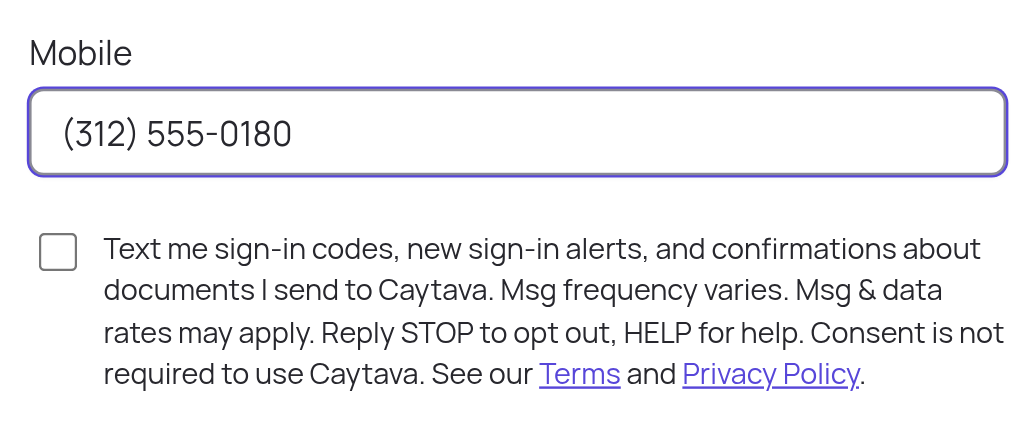
Opt-in happens only inside the user's own signed-in Caytava account, on Profile → Mobile number. The user enters a mobile number and then checks a separate checkbox that is unchecked by default. Saving a number without checking the box sends nothing. Checking the box is not required to use Caytava.
The checkbox reads, exactly:
Text me sign-in codes, new sign-in alerts, and confirmations about documents I send to Caytava. Msg frequency varies. Msg & data rates may apply. Reply STOP to opt out, HELP for help. Consent is not required to use Caytava. See our Terms and Privacy Policy.
When the user saves with the box checked, we record the date and time, their IP address and the version of this disclosure, and send one confirmation text.
This is the screen as it appears to the user:
The messages we send
These are the exact messages. Text in braces is filled in for the user.
| When | Message |
|---|---|
| After opting in | Caytava: You're set up for sign-in codes, new sign-in alerts and document confirmations at this number. Msg frequency varies. Msg & data rates may apply. Reply HELP for help, STOP to opt out. |
| Signing in | Caytava: Your sign-in code for {email} is {code}. It expires in 5 minutes. Don't share it. Reply STOP to opt out. |
| Sign-in from a new location | Caytava: New sign-in to {email} from {City, ST} on {date and time}. If this was you, ignore this message. If not, reply NO or contact support@caytava.com. Reply STOP to opt out. |
| Reply NO to an alert | Caytava: Thanks. We signed out all sessions for {email}. Sign in again and contact support@caytava.com if you need help. Reply STOP to opt out. |
| A document is filed | Caytava: Got it. 1 receipt filed to {company}. It will appear in Documents shortly. Reply STOP to opt out. |
| Several documents filed | Caytava: Got it. {count} receipts filed to {company}. They will appear in Documents shortly. Reply STOP to opt out. |
| Unsupported attachment | Caytava: We couldn't file that. Send a photo or a PDF of the receipt or bill. Reply STOP to opt out. |
| Number linked to more than one company | Caytava: Your number is linked to more than one company, so nothing was filed. Upload it in Caytava -> Documents. Reply STOP to opt out. |
| Reply HELP | Caytava: Sign-in codes, new sign-in alerts and receipt filing for your Caytava account. Text a photo of a receipt or bill to file it. Help: support@caytava.com or caytava.com/sms. Msg & data rates may apply. Reply STOP to opt out. |
| Reply STOP | A standard confirmation sent by the carrier platform (Twilio) that you are unsubscribed. You will get no more messages from this number. Reply START to resubscribe. |
| Reply START | Caytava: You're resubscribed to sign-in codes, new sign-in alerts and document confirmations. Msg frequency varies. Msg & data rates may apply. Reply HELP for help, STOP to opt out. |
Caytava sends nothing to a number that has not opted in through the form, including a reply to anything it texts us. The carrier platform (Twilio) itself answers the standard keywords STOP, START and HELP.
Message frequency
Message frequency varies with how often the user signs in and how often they text us documents. There is no schedule and no campaign.
How to opt out
Reply STOP (or STOPALL, UNSUBSCRIBE, CANCEL, END or QUIT) to any message. The carrier platform sends one confirmation and then nothing further comes from Caytava. Clearing the mobile number or unchecking the box in Profile → Mobile number also stops all messages.
Resuming after you opt out
A user who opted in through the form and later replied STOP can reply START or UNSTOP to resume. This is not a way to opt in: texting START does not subscribe a number that never opted in through the form, and Caytava sends it nothing.
How to get help
Reply HELP to any message, or email support@caytava.com.
Cost
Message and data rates may apply. Caytava does not charge for these messages; your mobile carrier's standard rates apply.
Carriers
Carriers are not liable for delayed or undelivered messages.
Privacy
No mobile information will be shared with third parties or affiliates for marketing or promotional purposes. Text messaging originator opt-in data and consent will not be shared with any third parties, except service providers (such as our messaging carrier) that deliver messages on our behalf. See section 13 of our Privacy Policy and Exhibit C of our Terms.
Contact
Caytava, Inc. — support@caytava.com